
For developers
 Less time spent pinging teammates when work is ready to hand-off
- Always know when its time to get to work on an issue
Workflow automation
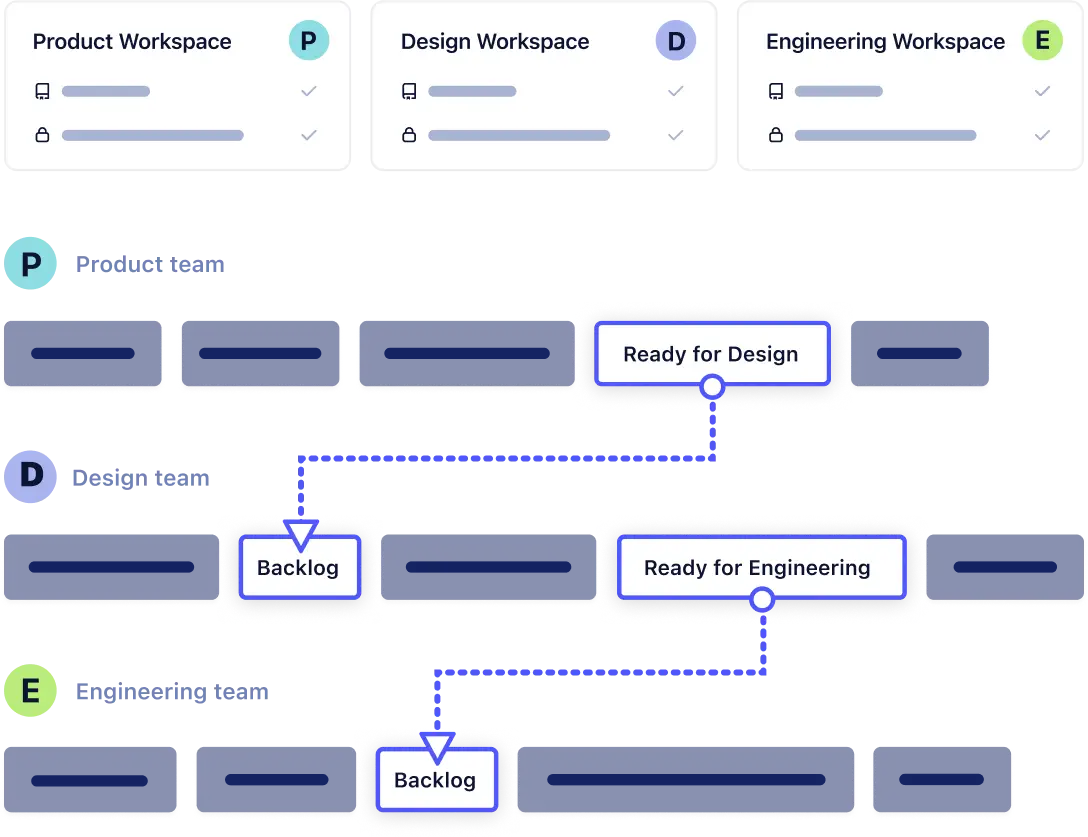
Let work flow easily from one collaborator to another. Workflow automation can trigger the movement of an issue from one board to a new board’s pipeline based on its status.
Allow handoffs between teams and contributors to become a seamless part of everyday processes with little to no human intervention.

Ensure work always moves to the next collaborator the moment it's ready by automating issues between multiple boards.
Leveraging a single issue across multiple boards allows teams to see all the work that came before an issue was assigned, minimizing errors and the need for clarification meetings.
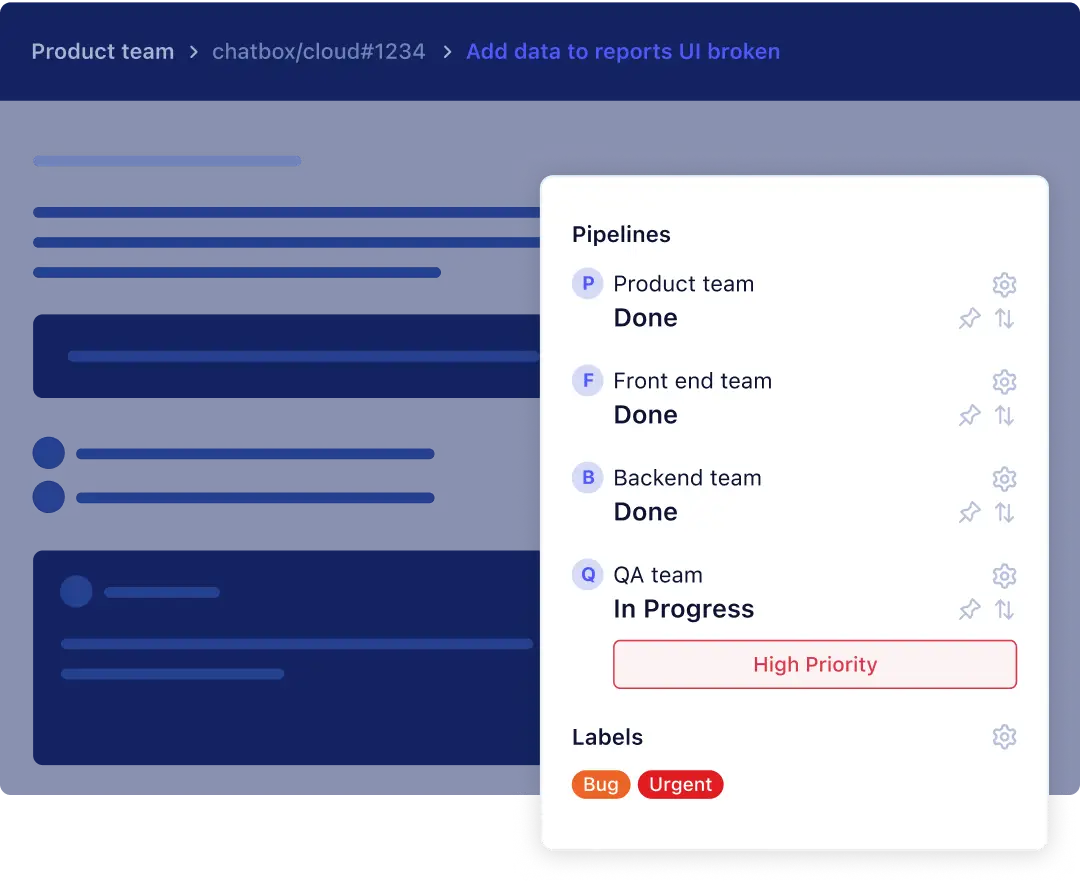

Allow work to flow automatically from technical teams working in GitHub to non-technical teams and vice-versa.
Allow GitHub issues to flow from one scrum team's Kanban board to another when issues are ready to be worked on.
testimonials
“We now have a record of progress and discussion. ZenHub has made our workflow simple and organized.”
Read the story
Ranu Rajkarnikar
Project Manager at ustwo
Why Zenhub
Less time spent pinging teammates when work is ready to hand-offAlways know when its time to get to work on an issue Implement work hand-off processes fasterEnable cross collaboration between teams working in different Kanban boardsLess human error and missed hand-offs
additional zenhub features




glossary
Kanban boards
Kanban boards are a project management tool for recording and tracking tasks. The boards are divided into several “pipelines,” representing the task’s status. Kanban boards are a common tool in agile project management.
Workflow automation
Workflow automations in Zenhub connect work being done in one Kanban board to another. Automation allows one issue to move from one board’s pipeline to another when it’s ready to be worked on by a new collaborator.
Pipeline
“Pipelines,” on a Kanban (or Agile/Scrum) board, represent the status of the work being done. For example, “In review” may be a status.
Issues
“Issues” in agile project management are another word for smaller tasks or individual units of work. In Zenhub, issues best suited to developers are GitHub Issues and issues best suited to non-technical team members are Zenhub Issues.
Workspaces
A workspace is a place where one team hosts their work. Workspaces can consist of multiple GitHub repositories and can be connected to one another using Workflow automation.
Need Help?
Zenhub boards are where you manage your work. Zenhub boards allow you to see the status of various GitHub issues are they’re being worked on, move issues between pipelines and prioritize issues.
In Zenhub, a change in the status of an Issue, which is when you move an issue from one pipeline on your Kanban board to another, is what triggers automation. For example, when an issue moves to the “Closed” pipeline in Board A, it will then be moved to the “In Design” pipeline in Board B.
First – you’ll need more than one workspace to connect the two. You can set up workflows by heading to the “Workflows” section on the left-hand side of your Zenhub board. From here, you can select a “trigger” pipeline, this is the pipeline that will trigger the movement of an issue. You then can select a “destination” pipeline, which is the pipeline the issue will move to once it’s been triggered.