- Project Management
- Productivity
Backlog Grooming: How to Run Refinement That Doesn't Waste an Hour

Short answer: Backlog grooming (also called backlog refinement) is a regular session where the team reviews upcoming work, clarifies what each item means, splits big items into smaller ones, estimates them, and puts them in priority order. Done well, it means sprint planning takes minutes. Done badly, it’s an hour of reading tickets out loud.
Most refinement meetings fail the same way. Someone shares their screen. The team scrolls to a ticket titled “Fix the export thing.” Nobody remembers what the export thing is. Ten minutes later, someone finds the Slack thread where it was discussed, and it turns out it was fixed in March.
Repeat for 40 tickets.
The meeting itself isn’t the problem. The prep is. Grooming is supposed to be where a team makes decisions about work. It usually turns into the place where the team reconstructs what the work even is.
What is backlog grooming?
Backlog grooming is the ongoing work of keeping a product backlog ready to pull from. The team reviews upcoming items, adds detail and acceptance criteria, breaks large items down, estimates effort, removes what’s no longer needed, and orders the rest by priority. Scrum calls this backlog refinement.
The two names mean the same thing. “Refinement” is the term in the Scrum Guide, and many teams have switched to it. Search still favors “grooming,” which is why you’ll see both.
A healthy backlog has a simple shape. The top few sprints’ worth of items are small, clear, and estimated. Further down, items get bigger and vaguer, and that’s fine. Nobody should be writing acceptance criteria for work that’s six months out.
If you’re fuzzy on how this connects to the sprint itself, our guide to what goes in a sprint backlog covers the difference.
Backlog grooming vs. sprint planning
Backlog grooming gets work ready. Sprint planning picks which ready work goes into the next sprint. Grooming happens continuously or weekly and looks a few sprints ahead. Sprint planning happens once per sprint and commits to a specific set of items.
| Backlog grooming | Sprint planning | |
|---|---|---|
| Goal | Make upcoming work clear and estimated | Commit to the next sprint’s work |
| When | Weekly, or mid-sprint | Start of each sprint |
| Looks at | The next 2 or 3 sprints of work | The next sprint only |
| Output | Ordered, estimated items | A sprint backlog and a goal |
If sprint planning keeps running long, the fix is almost always better grooming. More in our ultimate guide to sprint planning.
How often should you groom the backlog?
Most teams groom once a week or once per sprint, for 45 to 60 minutes. A common rule of thumb is to spend no more than about 10% of the team’s sprint time on refinement. If sessions regularly run over, the backlog is too big or the items aren’t being prepped beforehand.
Weekly works for most teams on two-week sprints. Some teams skip the meeting and refine asynchronously, with a product manager and tech lead doing a first pass and the team commenting on the issues directly. That works well when items are mostly small and well understood.
A backlog grooming agenda that fits in 45 minutes
The trick is to move everything that isn’t a decision out of the meeting.
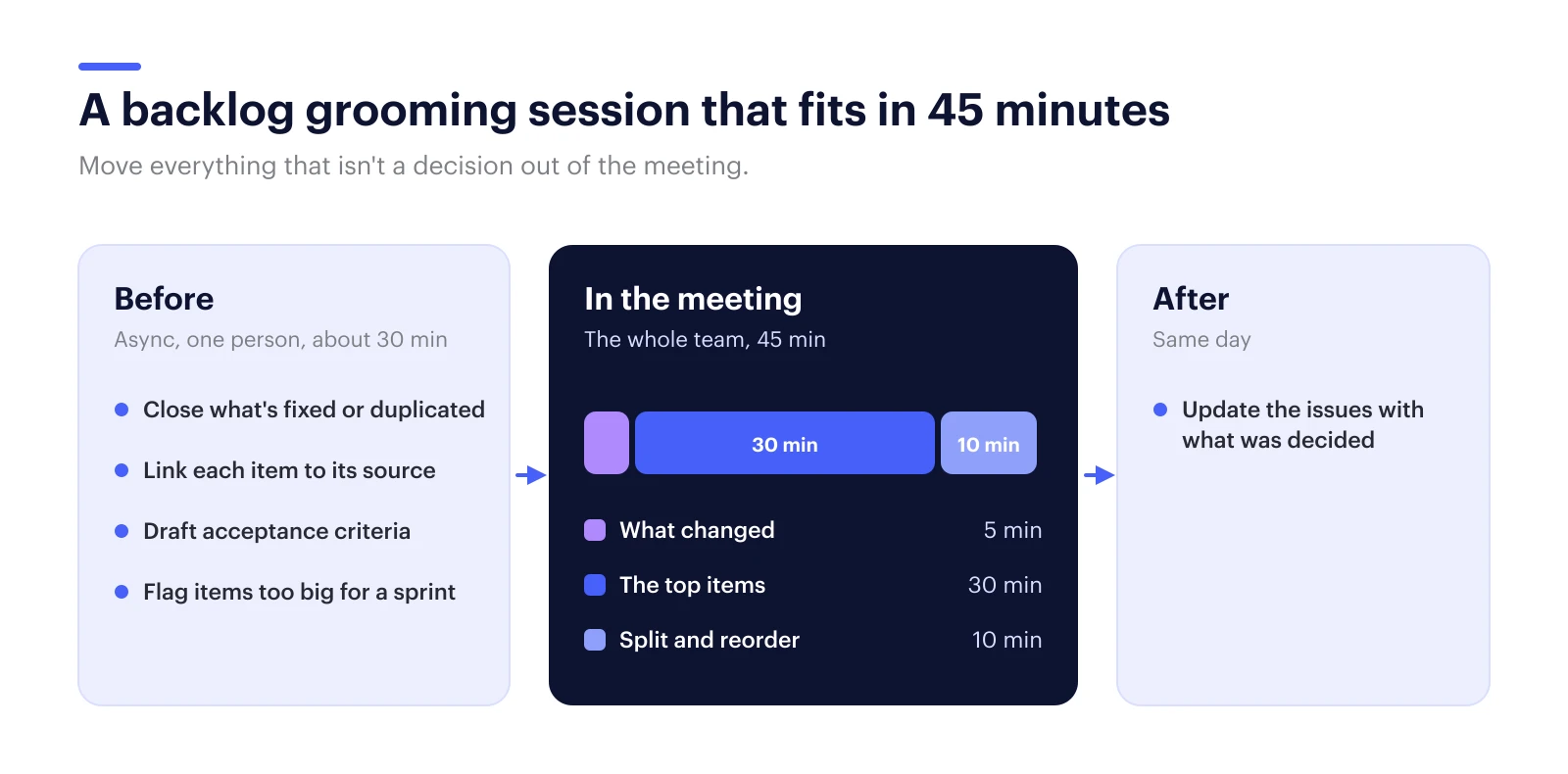
Before the meeting (async, about 30 minutes for one person):
- Close or archive anything that’s been fixed, duplicated, or overtaken by events.
- For each item near the top, link the Slack thread, meeting, or doc where it came from.
- Write a first draft of acceptance criteria for anything the team will discuss.
- Flag items that look too big to finish in one sprint.
In the meeting:
- Five minutes: what changed. New priorities, anything that got escalated, anything that got dropped.
- Thirty minutes: the top items. For each one: does everyone understand it, is it small enough, what’s the estimate? If an item needs more than five minutes of debate, take it offline and move on.
- Ten minutes: split and reorder. Break down anything flagged as too big. Agree on the order for the next sprint.
After the meeting: update the issues with what was decided, the same day. This is the step that gets skipped most, and it’s why the same ticket gets re-discussed two weeks later.
Backlog grooming best practices
- Keep the top of the backlog short. Two or three sprints of refined work is plenty. Refining further out wastes effort on items that will change.
- Write acceptance criteria as checks, not paragraphs. “Export includes archived issues” is testable. “Export should be more complete” is not.
- Split by user value, not by layer. One ticket per thin slice of working behavior beats separate frontend and backend tickets. Our post on vertical slicing goes into this.
- Delete aggressively. If an item has sat untouched for six months, it’s probably not important. Close it. If it matters, someone will bring it back.
- Record where each item came from. “Why is this in the backlog?” is the most common grooming question, and it’s the easiest one to answer ahead of time.
Where AI helps with backlog refinement
AI is good at the prep work for backlog refinement: drafting issues from meeting notes, breaking large items into smaller ones, writing first-draft acceptance criteria, linking each item to where it was discussed, and flagging stale or duplicate tickets. The team still decides priority and scope.
Most of the “before the meeting” list above is clerical. It’s important, but it’s reading and re-typing. That’s the part AI handles well now.
A typical example: a team has a rough idea in a Slack thread (“we should let people export archived issues too”). With AI doing the first pass, that thread becomes a few draft issues with acceptance criteria and a link back to the conversation. A person approves them before they land in the backlog.
This is the job we built Thor for. Thor is an AI project manager for software teams, from the team behind Zenhub. It organizes the backlog in GitHub or Linear: it drafts issues from meetings and Slack threads, splits big items, links each one back to its source, and flags work that’s gone stale. For anything that needs a spec, Thor can write and question the spec using what your team has already decided, so the meeting doesn’t relitigate last quarter’s decisions. Every change is a proposal you approve.
The grooming meeting doesn’t go away. It just becomes the part that was always worth having: the team making decisions.
FAQ
What’s the difference between backlog grooming and backlog refinement?
Nothing. They’re two names for the same practice. The Scrum Guide uses “backlog refinement,” and many teams have switched to that term, but “grooming” is still widely used and more commonly searched.
Who should attend backlog grooming?
The product owner or product manager, the tech lead, and the engineers who will do the work. Designers and QA join when the items need them. Keep it small enough that everyone talks.
How long should backlog grooming take?
Usually 45 to 60 minutes once a week or once per sprint. If it regularly runs longer, prep the items before the meeting so the session is only for questions and decisions.
Can AI do backlog grooming?
AI can do most of the prep: drafting issues, splitting large items, writing first-draft acceptance criteria, and flagging stale or duplicate tickets. Deciding priority and scope should stay with the team, with a person approving any change to the backlog.
If your grooming meetings are mostly reconstruction, Thor can do the prep before anyone opens the board. It works in GitHub, Linear, Slack, and your meetings, and every change waits for your approval.